1. Use the "Altyazı Aracı ve Dönüştürücü" to convert a SRT subtitle file into a CSV file
Open the free Altyazı Aracı ve Dönüştürücü, select "SRT" and set "convert" to "CSV for Google Sheets". Generate and download the file. Dosyayı dönüştürürken sorun yaşarsanız ücretsiz destek ekibimizle iletişime geçebilirsiniz.
2. Import the CSV file into Google Sheets
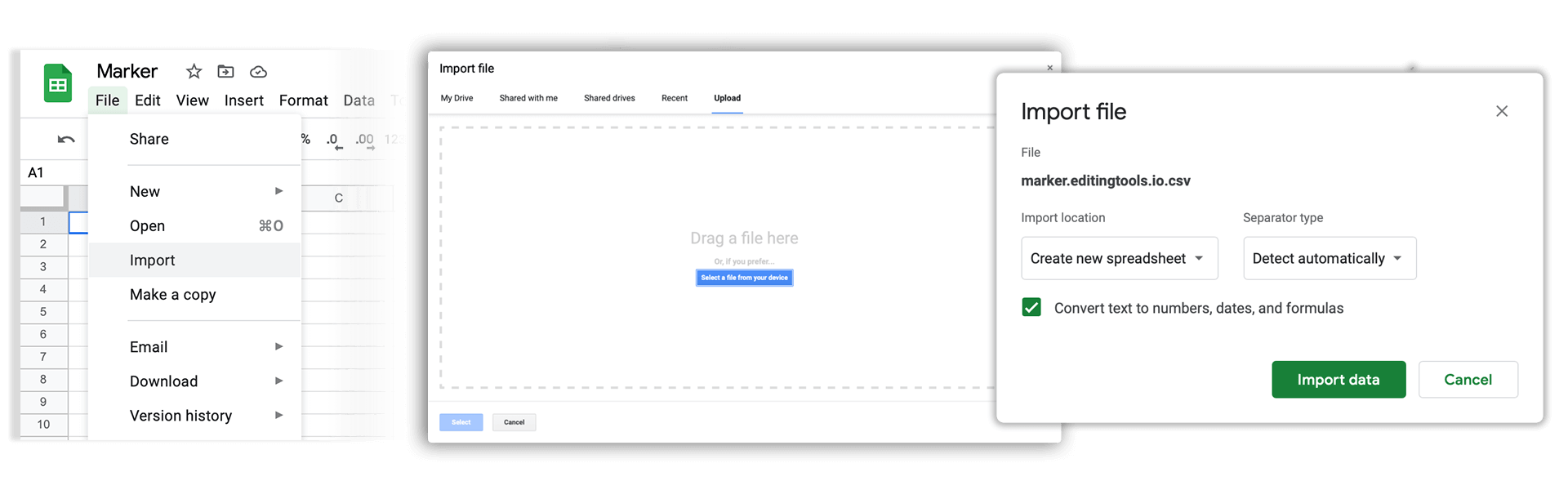
Open Google Sheets and go to "File -> Import". Upload the generated CSV file and press "Import Data" to generate the Sheet with all markers.
🚀 Bitti
Şimdilik bu kadar! Bu eğitimi faydalı bulduysanız bizi desteklemek için lütfen paylaşın. İş akışını nasıl iyileştirebileceğimize dair önerileriniz varsa lütfen bize bildirin!