1. Export a SRT subtitle file from Adobe Premiere Pro
Open the sequence in Premiere Pro and go to File > Export > "Captions". Choose "SubRip Subtitle Format (.srt)" from the export window.
2. Use the "Altyazı Aracı ve Dönüştürücü" to convert the SRT subtitle file into a Final Cut 7 XML marker file
Open the free Altyazı Aracı ve Dönüştürücü, select "SRT" and set "convert" to "Adobe Premiere Pro > Sequence (.xml)". Generate and download the file. Dosyayı dönüştürürken sorun yaşarsanız ücretsiz destek ekibimizle iletişime geçebilirsiniz.
3. Import the Final Cut 7 XML marker file into Adobe Premiere Pro
To import timeline markers, go to "File -> Import" and select the XML file.
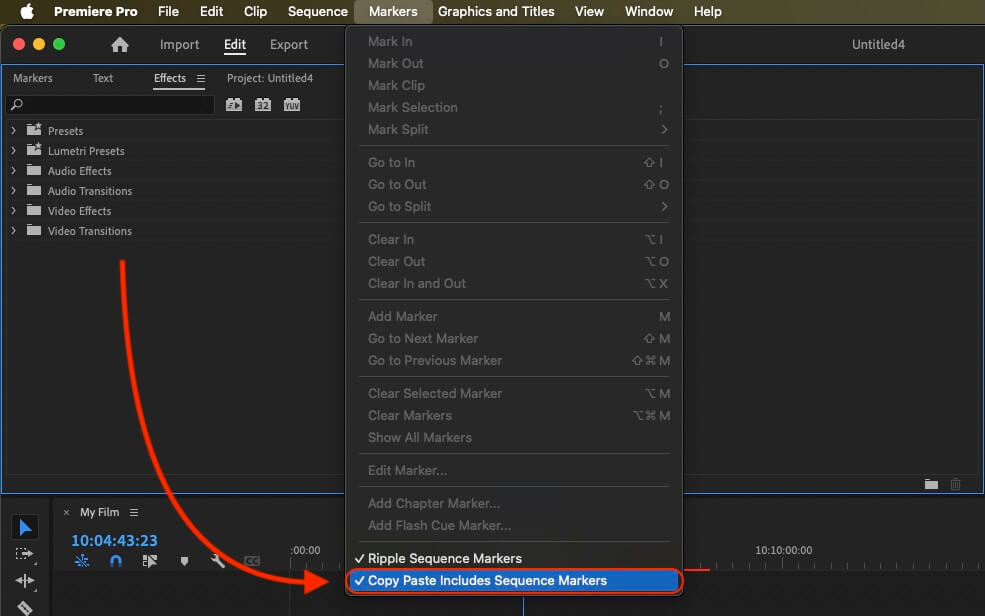
If you want to copy these markers into the existing sequence, use the adjustment layer or any other video as placeholder. Then copy the clip and switch to your existing sequence. Move the cursor to the location, where the adjusmtent layer or first marker appeared in the other sequence. Then past it. It will only copy the timeline markers if under setting (in the Markers menu) the option "Copy Paste Includes Sequence Markers" is active.
🚀 Bitti
Şimdilik bu kadar! Bu eğitimi faydalı bulduysanız bizi desteklemek için lütfen paylaşın. İş akışını nasıl iyileştirebileceğimize dair önerileriniz varsa lütfen bize bildirin!