1. Export a CSV marker file from Pix
Open the comments panel on the right side in Pix. Press the three dots and select "Export". Now you can then download the CSV file from Pix.
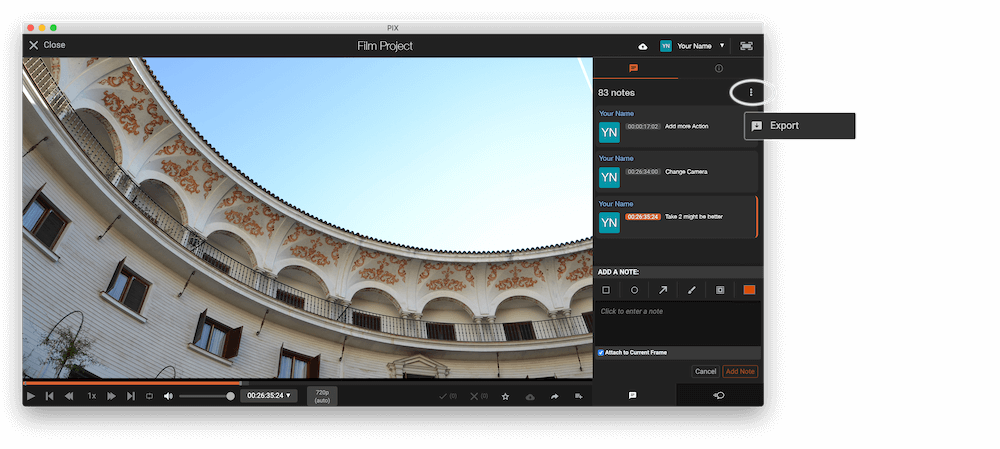
The timecode in Pix starts with 00:00:00:00 for each clip, so you may need to use the offset function on EditingTools.io to sync it with you timeline or move it manually in your NLE (editing software).
2. Use the "İşaretleyici Dönüştürücü" to convert the CSV marker file into a TXT marker file
Open the free İşaretleyici Dönüştürücü, select "Pix Systems > Comments (.csv)" and set "convert" to "Avid Media Composer > Marker Text (.txt)". Generate and download the file. Dosyayı dönüştürürken sorun yaşarsanız ücretsiz destek ekibimizle iletişime geçebilirsiniz.
3. Import the TXT marker file into Avid Media Composer
To import timeline markers, go to: "Tools -> Marker". Right Click on "Import Markers". Select the Text file and import.
Avid Media Composer might fail importing markers if they overlap.
🚀 Bitti
Şimdilik bu kadar! Bu eğitimi faydalı bulduysanız bizi desteklemek için lütfen paylaşın. İş akışını nasıl iyileştirebileceğimize dair önerileriniz varsa lütfen bize bildirin!